11. Why do we do retrospectives?

[This post is part of Corinna’s Guide to Facilitating Retrospectives]

Hi friend!

This is the first of three emails on follow-up. I’d like to start by taking a step back and inspecting our reasons for doing retrospectives.

Spoiler Alert: I’m not doing retros because the Scrum Guide says so.

But why do we do them? Why invest our time to prepare and then everyone’s time when we all meet. What do we hope to gain for the time invested?

I invite you to think about that for 2 minutes. Close your eyes. Why do you run retrospectives?

[Two minutes later]

Did you really take the 2 minutes though??

If not, here’s another chance to press pause and think.

You thought about it? Great! What are your reasons?

To me, there are two main goals in retrospectives:

Shared Understanding and Change

Everybody sees the world differently. The retrospective is an opportunity to realize that there are many different interpretations and reactions to any given event. I want to make sure that everyone’s voice is heard.

Sometimes a retrospective does not result in any experiments. That is okay if it is an exception and the team members learned something about each other and how they tick. The shared understanding will then – hopefully – result in change even without concrete action items.

But usually you want the team to explicitly try something new as the result of the retrospective – an experiment. Obviously, you’d love for the experiment to improve things, but they won’t always do that and there’s no way to know in advance. The team has to try things out to see if they are an improvement or not.

Aim for small experiments. They have a higher chance of actually being implemented. If an experiment works: Great! If it doesn’t, you haven’t invested much and can try something else. Rinse and repeat for continuous improvement.

It’s also better to limit yourselves to a few experiments. If you’ve got lots of experiments, chances are very high that none of them will be carried out. If you’ve only got 1-3, they have a better chance of actually being implemented.

Experiments come in two flavors: Action Items (AIs) and Rule Changes.

An Action Item is a concrete action that someone will do:

  • “schedule a meeting”,
  • “tidy up test-suite”,
  • “get input from the Ops team”,

Rule changes mean that the team will try to work together differently:

  • “everybody will answer these 3 questions in the daily standup”,
  • “we will groom upcoming stories every Wed 3pm”,
  • “we will prepare the product demo the day before the review”,

The team will try the new rule for a period of time, e.g. 2 iterations (whatever timeframe makes sense to see the rule in action). When the trial period is up, they review the rule to see if it solved their problem. Many teams have a “Working Agreement” to list all team rules.

My next post will cover what exactly increases the chances of follow-through for an AI, because the examples above aren’t actually that great. They’re not specific enough.

Until then, a core part that helped me for years are the SMART criteria. Start with those and you’ll already be off to a good start: 

Everything else on how to craft a good action (or new rule), I’ll cover next week.

All the best and see you then, 

Corinna

PS: When I teach workshops on retrospectives, I start with the “Why do we do retrospectives?”-question. So far, almost all the answers were things I’d support. What makes me slightly cringe is when words around the concept of “judging” come into play. They do not help with the blameless mindset that’s beneficial in retros as per the Prime Directive.

PS: If you'd rather read this Guide as an ebook, click here. Or go all in and get it as part of the Retromat eBook Bundle at a discount. A purchase also supports Retromat as a whole 🙂

10. During the retrospective – The actual facilitation10.

[This post is part of Corinna’s Guide to Facilitating Retrospectives]

Welcome back, friend!

We’re at the midpoint of the course but it was actually the very last post I wrote. In fact, I almost forgot the topic altogether. Not because it’s not important but because it’s mostly invisible to me while I do it. The other parts of facilitation – proper preparation and follow-up – I block time for but the actual facilitation is the meeting itself, no “extra” event. 

So much of what I do when I facilitate has become automatic. It is hard for me to drag it out of semi-awareness into the light to consciously inspect. There was a lot of “Okay, but how do I actually do this?”-reflection involved.

For the team, this is inverted: facilitation during the retro is the most visible part of my work with the biggest impact for the participants.

That might be, why it’s hard to learn how to facilitate a meeting from a book (or blog post for that matter). If there’s any way for you to take part in an actual in-person workshop on facilitation, do it! Additionally, take every opportunity to practice facilitating. Observing other facilitators is also a great idea, especially if you can shadow capable ones. Facilitation is a broad skill that will translate to any meeting, not just retrospectives.

So, how do I see my role during the retrospective?

I’m there to provide structure not content. For example, I set the categories in which we collect topics but not what topics get written down. As a Scrum master I may set the topic wholesale (after running it by the team: “I will bring topic X. If you see something else as more important or urgent, come talk to me”) but not what they do within the topic. I define how many votes each person can cast but not what to vote for. I allocate X minutes of discussion time but rarely influence the actual discussion.

The value I add as a facilitator:

  • [Preparation]
    Covered this in previous posts
  • Providing structure
    With the activities I picked – already covered
  • My undivided attention and genuine interest
  • Asking questions to bring out observations, clarify, and broaden what’s possible
    More on this in a later email. Impatient? Check out the Debriefing Cube and Asking for a Better Future
  • Note taking during the discussion in a highly visible place
    This validates people’s input and cuts down on repetitions
  • Making sure decisions happen, sometimes seemingly plucking them out of “thin air”
  • Making action items more concrete
    More on this in a later post
  • Intervene in the few situations I think it’s necessary
  • Time-keeping
  • [Follow-up]
    More on this in a later post

Arriving at Decisions

After each inner loop – discussion of a topic until thumbs down – I take time to wrap it up by asking whether the team want to follow up on this topic with an action item, a todo or a rule change. They usually do. If a new discussion erupts about what exactly to do, I’d ask for another vote on whether to spend time on this or fold without an action. 

I try to keep this “afterburn” short, like 2 to 5 minutes. This usually works, because I take notes of all the solution ideas that people suggest during the discussion. If it feels like a specific proposal had broad support I will just ask, “There seems to be broad support for suggestion X. Can I write it down as your action item?” If yes, we will then add details to make it more actionable. 

If there was no clear favorite, I will present all options and ask, “What’s something small that you can try?” There are instances in which a team doesn’t want to take any action for a specific topic and if that doesn’t happen all the time, then that’s okay. I’d rather have few action items that get implemented than too many.

If you are only starting out as a facilitator, I recommend a more structured approach to action items, because people get really angry when you mark something as “decided” when they feel like they haven’t had a say in it.

I’m Hands-off

On the “explicitly steer the discussion vs. completely hands-off”-spectrum I am quite close to the “hands off” extreme. I talk very little and interrupt the flow rarely. When I do, it’s usually with a question. Almost every facilitator I had the privilege of observing, interrupts more than I do. This is an observation, not a judgment. I’m not saying that “hands-off” is better, it’s merely my style. I shifted towards it over the years nudged by my interest in clean language and solution-focused coaching

Things that support my hands-off style:

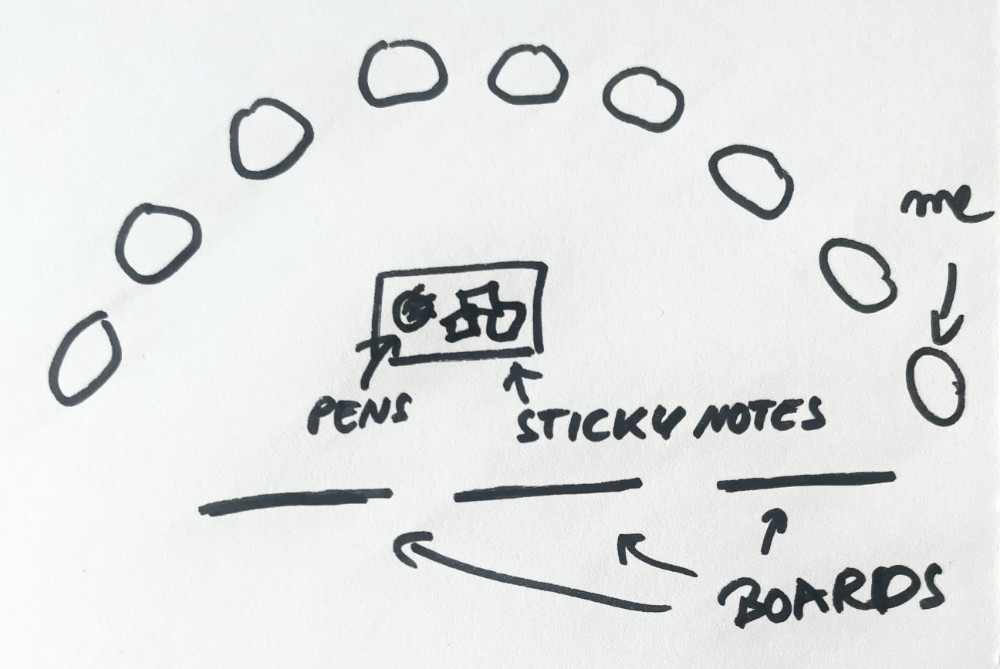
  • I sit to the side of the board and try to melt into the background. I want the participants to talk to each other, not to me. I’m there to provide structure and thought-provoking questions. I’m not a show master. Apart from instructions, I should not be the focus of their attention.
  • For virtually every activity, I give time to think in quiet (and take notes) before participants go round robin. Not everyone is a chatterbox like me. Shy and/or introverted people have valuable perspectives to add. In order to make it more likely for them to speak up, I make everyone shut up and write first. That levels the playing field for less outspoken people and I don’t have to make sure that everyone gets a turn, because I create conditions for it to occur “naturally”.
  • We all follow basic meeting etiquette and queue to speak. Teams can do a lot to co-facilitate. Chain questions are one specific example to deflect focus from you as the facilitator
  • Setting a timer that’s visible to all
    Having a countdown in a visible spot means that most people are aware of time and try to stay within the limit. And when the time is up, the timer beeps and I don’t have to interrupt. I’m not the bad guy, the timer is. For real, physical meetings in meat space I highly recommend TimeTimer
  • If I work long-term with a team I will offer my observations after the retrospective. More on this here in the paragraph “Style Critique”

Maybe I’m lucky that I work with teams that need little guidance. But I think it’s also something particular to me. My mantra is “Everybody is the expert for their own situation” from Solution-focused Coaching. 

Instead of “You are off-topic” I would say “Our topic was X. It sounds like you’re now discussing Y. Is that what you want?” Because who am I to say which of the two topics is more important to them. It’s their time, they get to decide how they use it.

Over the years I’ve often seen teams self-regulate: Approximately 10 seconds after I started wondering if now is the time to intervene and get a discussion back on track, someone from within the group will rein the them back in. I always love it when that happens, because I’d rather teach teams to do it themselves. Their discussions will be productive even when I’m not there. 

Oh! Okay, writing that out actually revealed one of my big underlying goals! I’m always trying to make teams self-sufficient, to teach them so that they can do the basics themselves.

For the record, this is just my style and goal. It’s not “the right way” to do it. I’ve seen all kinds of facilitation styles work. My real-life boards are ugly, my digital boards look nice. I never bring sweets. I do follow up on action items. I’m hands-off. It’s how I roll. You’ll figure out what works for you, too.

When will I intervene?

Obviously there are situations that will make me intervene and cut into a discussion, e. g. these:

  • When the discussion seems to be going in circles
    This rarely happens if someone (usually me) takes notes on a board
  • When I suspect that the team avoids something, be it a topic or taking responsibility
  • Disruptive behavior, esp. when repeated
    I will neither let people talk over others, nor let one person drone on indefinitely
  • When emotions are running very high
    People are getting visibly distressed, crying, personal attacks, raised voices, …

Complicating matters

There are circumstances that can render “hands-off” impossible. I can think of at least three:

1) Your job description (ie Scrum Master or Agile Coach) contains a teaching/steering component

I just said, “Everybody is the expert on their own situation” and I stand by it, but there might be situations when you have considerably more knowledge than the people you are holding space for. 

When I see a team struggling to come up with solutions and I know a ton about the subject matter, I will deliberately step out of the facilitator role: “I have seen this solved in different ways. Would you like to hear the solutions I know about?” (It is okay for the team to say no but that hasn’t happened yet) 

Another case is, when a team is honing in on a solution that violates agile principles in a company that’s striving to work more agile-y. I would let the team discuss all kinds of solutions, and hope that a team member objects to a non-agile solution. That’s more powerful than if I do it. But if they seem to settle on the non-agile solution I would point out the violation.

2) You’re part of the team you are facilitating for

This applies to me right now. I facilitate but I’m also a team member and it’s my retro, too. The lines are blurry but at least I am not in a position of authority over anyone. If there is no other order implied, I go last.

I’ve lately realized that I’m the only one who goes crazy with the reaction emojis in Google Meet. That’s just the way I am as a participant. Yet, the lines for me as facilitator are blurry and I wouldn’t want anyone to think that this is a judgment by the facilitator. Maybe that is a problem, maybe it isn’t. I don’t know yet. I’ll ask before the next retrospective. 

If you are in a bigger company, maybe you can swap with someone in another team? I worked in a place with a Philipp-swap: Each team had a Philipp that at first facilitated his own team’s retrospective. Then they agreed on swapping and facilitating for the other team so that they could take part in their own team’s retro without the double role.

If that is not an option, in co-located retrospectives you can use standing versus sitting to mark different roles. Stand when facilitating, sit down to participate in the discussion as a team member. Brian Tajuddin reports that this has worked great for him as a clear visual clue.

3) You’re in a position of authority

I’ve met quite a lot of team leads who started running retrospectives in their team. This is certainly better than not having any means for reflection and improvement but it’s not ideal. If it works in your case, congratulations on your Psychological Safety.

Be even more careful with your reactions, with showing approval and disapproval. Go last with your ideas and opinions so that the others will not prematurely conform to yours. Maybe you, too, can swap with someone else?

Wow, that was a long ass post. But you made it – Congrats and thank you for reading!

Take a minute:
What is your personal facilitation style so far? What would you like it to be? What feedback does your team give you about what works well for them?

Next week we start exploring follow-up. Wishing you a wonderful week,

Corinna

PS: Regarding the role of facilitation: I thought about what’s important to me and did not check whether it aligns with the definition of e. g. the International Association of Facilitators. So take mine with a grain of salt.

PS: If you'd rather read this Guide as an ebook, click here. Or go all in and get it as part of the Retromat eBook Bundle at a discount. A purchase also supports Retromat as a whole 🙂

9. Remote Retros – What’s different?

[This post is part of Corinna’s Guide to Facilitating Retrospectives]

Hi there,

last week’s post had a co-located perspective. But nowadays, a lot of meetings, retros included, are remote. I’ve mostly facilitated via videocall, ever since Covid hit. At my workplace, we switched to everyone working from home virtually overnight and all my retros were suddenly virtual. The good news is, most things translate well into online retros.

For a long time, I had assumed that almost every activity could be adapted to work remotely and ever since creating the Retromat Miroboard Mega Template, I’m sure: Out of 146 activities, only 16 do not easily translate into a remote context.

Apart from adapting the activities, there are other things that are notably different in a remote setting:

  • Easier to prep for, harder to run
    I find it easier to prepare for remote retros: No need to book a room, make sure that the markers work, clean boards or other physical prep work. And ever since I built the Miro Templates, I’ve gotten really fast at prepping for a remote retro.
    During the retro, I find it harder remotely, mostly because of the tech hiccups that inevitably happen, like people suddenly dropping from the call.
  • Harder to stay focused
    Maybe that’s just a me-problem but I find it much harder to stay focussed in a remote setting, especially when I am waiting for others to finish a silent round of writing. In a co-located retro, there is nothing else for me to do but be present. Remotely, everything else I could be doing is just one browser tab away.
    And concentration in general is harder to keep up when all you do is stare at a screen. I try to have a break roughly every 60 minutes (compared to every 80 minutes for a co-located setting).
  • Body language and positioning
    These are missing in a digital context. 
  • There is no implicit rotation
    If you are all in one physical space, sitting in a circle, participants can take turns in round-robin activities very easily. That’s much harder in digital settings and often leads to wasted time, while everyone is unsure who’s supposed to speak next. Some ways to solve this:
    • Have a virtual circle of the team members on a board
    • Use the list of participants in your video call tool, if it’s stable and the same for everyone
      (I’d love to use this but we use Google Meet which for each participant omits their own name in the list. Makes it very easy to be unsure about when it’s your own turn)
    • Ask participants to pick the next person at the end of their own turn
      (I mainly use this one, but honestly, with mixed results. People frequently forget to name the next person.)
    • Use the “raise hand” feature of your videocall tool
      (We use that feature all the time in free discussions but not when going around in circle, when I’d ideally want everyone to speak once.)
  • Anonymity is harder to achieve
    If you want to run an activity with anonymous input, you need to put in more thought beforehand

It’s very likely that there are things missing here

If I can, I avoid hybrid settings. My retros are either co-located or everyone is on the call independently. In my experience, in hybrid there’s a good chance that the sound is crap and there’s always someone out of the video frame. Plus, the co-located people tend to forget about the remote people. That being said, tech has actually gotten better in recent years, with mics and cameras that can focus on the speaker and it’s not a total pain anymore. But bad audio is incredibly exhausting and if I don’t have to, I don’t want to potentially waste my participants’ mental resources.

Take a minute:
Which mode do you prefer, remote or in-person? How do you solve the round-robin turn-taking in remote settings?

Okay, that’s that then! On to the “during” part of retros next week 🙂

Cheers, Corinna

PS: If you use Miro, our Mega Template might be interesting for you.

PPS: I’ve only mentioned digital boards like Miro, Mural, Conceptboard etc. There’s always other ways to do it. I’ve used easyretro.io and heard of shared Google Docs, shared Powerpoint decks and so on. As long as you can all edit and are all referring to the same source, try out what works best for you out of the tools that are available.

PS: If you'd rather read this Guide as an ebook, click here. Or go all in and get it as part of the Retromat eBook Bundle at a discount. A purchase also supports Retromat as a whole 🙂
8. Co-located Retros – Preparing the room and materials

[This post is part of Corinna’s Guide to Facilitating Retrospectives]

Welcome back!

Up until Covid, all my retrospectives were co-located. It’s the context in which I learned to facilitate and what informed most of Retromat. Today we will go over the logistics for co-located retros and next week we’ll look at how remote retrospectives differ.

Holding space – literally

One way to describe good facilitation is “holding space”. It’s meant figuratively but if the meeting is co-located then you also need to prepare the real, physical space.

Book a suitable room in advance. Get there early to set everything up for the retro. If you’re new to facilitation, make that at least an hour. This time will get lower as you get familiar with everything. But you’ll always want to have some time for last minute fixes and fetching missing stuff.

Team Room vs Different Room
I’ve just now realized that I’m so used to meeting rooms for retrospectives that I didn’t even consider using the team’s room (if they have a shared space).
I prefer a separate room to make it easier for the team to get into the retro headspace (“we’re doing something different now”) and so that we won’t be disturbed.
That being said, for some activities it is beneficial to stay in the space the team work in, such as “Room Service” or when you focus flow on boards.

If the room is booked immediately before your slot, prepare your equipment outside of the room.

I always use white boards, so I prep:

  • Board Markers for writing on boards and felt tip pens (I like Edding 1200 and 1300) to write the notes. I actually draw a line with each pen and sort out the ones that don’t paint well anymore.
  • Sticky notes in different sizes
    The expensive ones from 3m, cheap ones fall off the board. Actually, my new workplace provides reusable magnetic sticky notes from Bambook and these work pretty well. They definitely don’t fall off the board 🙂
  • Since I’ve prepped my activities in advance, I already know what I will draw on the boards, as soon as I can enter the room. Well, if the boards are clean, which they rarely are. So cleaning the boards, then drawing.
    I put effort into a lot of things, but physical boards are not one of them, sorry. Mine are very basic, that’s why I don’t need much time. That being said, teams usually do appreciate extra art work. (I observed that with other more diligent and/or artistic facilitators)

If you use flip charts, your list will look slightly different. Flip chart markers (I’m with the Neuland truthers), maybe sticky notes and felt tip pens, and you probably draw your charts beforehand, ready to hang up. Oh, something to put paper up with: Magnets, tape, needles, … Depending on what background you’re working with.

(Btw, here are my secret tips for more polished flip charts and sketchnotes.)

If you’re giving me a choice between co-located and remote retros (and it doesn’t depend on anything else like travel time, costs, health risks etc.) I’ll always choose co-located, because it gives me additional tools to use:

Body language

Someone’s body language is a valuable (even if sometimes misleading) source of information, not just for me, for everyone in the room! All of this is lost in a video call, and facial expressions are also harder to catch. All the shrugs, frowns, half-snorts, shuffling and turning away that clue you in to ask for clarification. It’s easier to pick up weird vibes and check in, in person.

Position in the space

Where and how someone sits influences how much they will take part. I use this to the group’s advantage. If somebody barely participates I will often try to physically bring them into the fold more: Are they sitting slightly outside the circle or apart from the group? I’ll invite them in.

Depending on the situation, I might talk to them after the retro in preparation of the next one, instead of putting someone on the spot during the retro.

Oh, I haven’t talked about the room setup yet!

For bigger teams (7 people or more) I set up the chairs in a flat u-shape around the whiteboards, with me sitting at one end of the u, so that I can easily get to the boards.

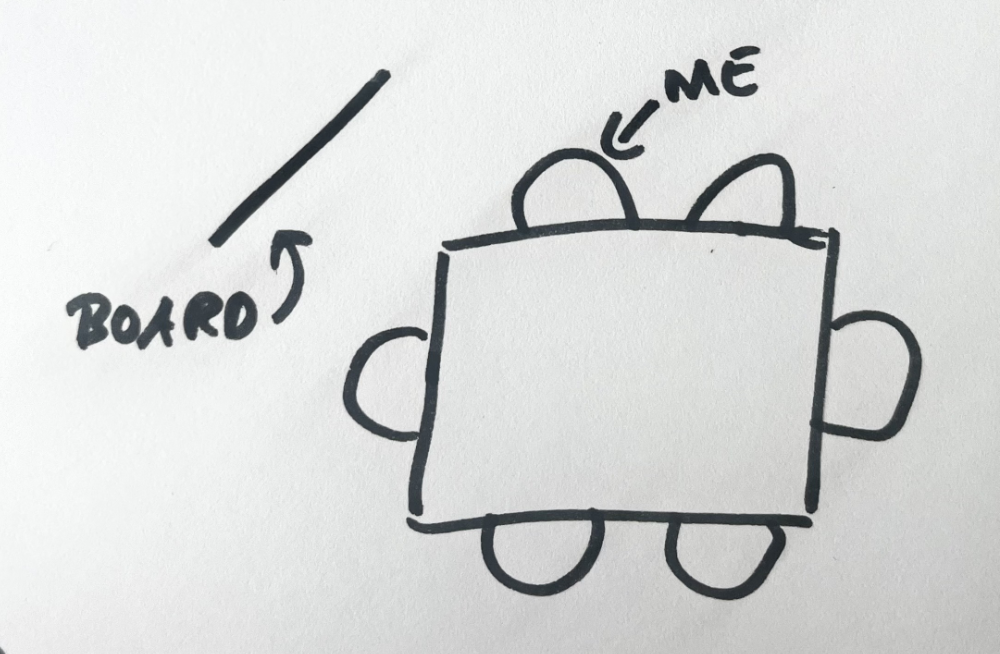
In small teams I tend to just have everyone sit around a table. That means that some people have to turn to see the whiteboard. I usually position the board at an angle at one of the corners, with me sitting next to it on one of the long sides, not the head of the table.

My goal with either setup is to increase the likelihood that team members will talk to each other, rather than with me. When I’m not actively explaining an activity I try to blend into the background.

Take a minute:

What room setups have you seen in workshops and meetings? How have they influenced the flow of the event? What would you like to try in your next retro?

Next week we’re gonna cover remote retrospectives. See you then *waves*

Corinna

PS: If you'd rather read this Guide as an ebook, click here. Or go all in and get it as part of the Retromat eBook Bundle at a discount. A purchase also supports Retromat as a whole 🙂
7. Other factors – How I plan a retrospective

[This post is part of Corinna’s Guide to Facilitating Retrospectives]

Hello again!

Here’s the hodgepodge of topics that I didn’t want to squeeze into last week’s post on how I pick activities. It depends on your context how much of my process might apply to you but at the very least you will know one way to do it and can figure out your way from there.

So, other factors to take into consideration, when choosing activities:

Are there activities that will be accepted better than others?

  • What’s the attitude towards retros? Do people want to take part?
  • Have individual people expressed preferences?

I cater towards wishes unless I think they are harmful. There are teams who crave novelty and are eager to try “crazy” stuff. There are teams that dislike “creative” association games.

There was one person who was okay-ish with stuff like “If the sprint was a food, what kind of food would it be?” as long as they didn’t have to come up with it on the spot. So as soon as I had picked my “Set the Stage”-activity, I would slack the prompt to them in advance. Half an hour was enough. I got to do whatever check-in I wanted and they got to be comfortable with it. It worked for both of us. The rest of the team knew of our compromise and never wanted in on the “spoiler”.

How experienced are the participants with group discussions? 

  • Are they already good co-facilitators? Do they take turns talking? Do they start clustering similar topics on their own?
  • Do they know basics like dot-voting?

The less experienced the team is with retrospectives, the more time you need to plan in for explanations. Check out my free book Facilitation is a Team Sport to find out more about how to make your life easier:

How’s the power (im)balance?

  • Are there formal hierarchies at play? Informal ones like seniority, some job roles being taken more seriously than others? 

Ways to counteract imbalances:

  • More written activities – makes people less likely to withdraw something in premature conformity/alignment
  • More anonymous activities
  • Outside of the retro: Ask more influential people to go late or last in round-based activities
  • Does it make sense to run the occasional retro without the team lead (or similar)?
  • Work on Psychological Safety (we’ll cover that in a later email) but ONLY if it is actually safe for everyone to speak up

Pay attention to other things that might surface in subtle ways (sexism, racism, homophobia, transphobia, ableism, …). It doesn’t have to be an active thing by anyone: The way we are all raised makes some people more comfortable with taking up time and space than others, and some people’s voices get more amplified because of what they look like. 

What about posting an agenda?

Some people whose work I greatly admire, post an agenda everytime. I rarely do, because my retros are on the shorter side, I work with teams long-term and everybody quickly learns the underlying structure.

When I work with a team that is new to retrospectives, I will talk briefly about the steps we’ll go through at the beginning and mention what times I’ve planned the breaks for. Other than that, I usually only post agendas for workshops upwards of 2 hours. 

Because this course is a lot of “I do it this way” I’d like to explicitly state that for many, many of my approaches I also know someone who goes about it completely differently and it also works. For them. It might not work for me because I’m different or because my team is different. There are a lot of ways to be a good facilitator and there are a lot of different teams out there. You’ve got to find an approach and style that works for you and your team. And I think you’re gonna rock it!

Take a minute:
Think about your team for a bit: What kind of activities would they love to participate in?
And what’s the internal power structure? How can you make sure that everyone gets heard?

On that note, I bid you farewell! In the next email we’ll dig a bit more into preparing a co-located retrospective. See ya,

Corinna

PS: If you'd rather read this Guide as an ebook, click here. Or go all in and get it as part of the Retromat eBook Bundle at a discount. A purchase also supports Retromat as a whole 🙂

6. Picking activities – How I plan a retrospective

[This post is part of Corinna’s Guide to Facilitating Retrospectives]

Hiho,

Today, I’ll share what I do when I sit down to plan a retrospective. This post will focus on picking activities and the next one will be a bit of a mixed bag of “oh, you might also want to consider this”.

Anyway, the first thing I do is look up what activities I used with this team last time and the times before that. My memory is like Swiss cheese so I note down which activities I do with a team for each retro. I don’t want to repeat myself too much or too early so that people stay engaged by new activities. I currently facilitate remote retros and just keep all of the retros for one team in the same big digital board – hey, presto: automatic archive 🙂

If I run the retrospective for more than one team, I tend to reuse a plan once for each team, unless there’s something specific to tailor to a team, either their current situation or their identity. When a team’s name is meaningful, I love to riff off on it. The team name is the name of an art movement? Better believe I bring pics of significant works every time. (Completely unrelated side note: I have weird niche knowledge about Dadaism.) Pokemon? Asterix? I will reference the hell out of these to support a shared identity.

Apart from that, my retrospectives all tend to follow the same basic layout that you’ve already seen in my previous posts:

1) Set the stage

I try to vary the focus e. g. in one retro focusing on feelings, in the next one on the sprint results, next one just for fun, and so on. My check in is often independent of whatever follows after. This is not what I would recommend. If you can make the check-in relate to what follows, that would be better. (But I’m honest here and that includes pointing out things I could improve on.)

1.5) Revisit the action items from last retro

Sometimes I bring back our decisions from the last retro to check whether we implemented them and if so, how our experiments worked out. More on that later in the course.

2) Gather topics

I haven’t worked closely with a team in years, which means that I don’t experience the daily routines of the teams I facilitate retros for. If there is a major disruption, I’ll hear about it but small stuff will pass me by unnoticed. That’s why 99% of the time I will use generic topic gathering activities so that the team can set the agenda.

If a team asks me to focus on a specific topic, I ALWAYS follow that request and will tailor all the activities towards that – up to and including creating new activities.

If you are sitting with your team every day you will likely observe things that prompt you to plan retros to address specific pain points more often than me in my more detached role. For inspiration, you can check out “Plans for Retrospectives”.

3) My Inner Loop

4) Closing

I usually ask about something the participants learned during the retrospective. Occasionally I will ask about how to improve the way I facilitate. When I start facilitating for a team, I will ask about the latter more often.

My inner loop is fixed. For all the other parts I open Retromat (yeah, I really scratched my own itch with that one) and use the arrows to step through the activities in the given phase until I find one that fits. For the “Gather topics” activity I’ll peruse both “Gather Data” and “Generate Insight” because the lines are blurry with those two.

When I’m done, I look at all the activities together. Does the plan as a whole make sense or is there an abrupt change in topic? E.g. I would not start with Amazon Review and then follow it with Movie Critic

Above, I’m sharing the retrospectives that I actually run, not the ones I think I should be running. Because I think I should run retros that adhere to the “5 phases” ideal from “Agile Retrospectives”. Yet, my retros have no 1:1 mapping of activities to match these phases: phases 2-3-4 are usually kind of merged without each of them having a specific activity dedicated to them *shrug*

Again, this is due to the fact that in my retros the team set multiple topics. It is what it is. And it has served my teams and me quite well. 

Do the activities fit timewise?

Next, I check that the plan roughly fits into the available time. How long are your team’s retros? 

The shortest retros I ever ran were 30 minutes. That actually worked because it was weekly and there were only 3 people who were quite aligned already.

For the biggest chunk of my facilitator life, I was on a 1 hour schedule for a 2 week sprint. That was always tight. We routinely took 65 minutes and I routinely dropped the closing activity due to time pressure 🙁

Then I moved to a team with 90 minute retros every 2 weeks and that worked much better. At my new workplace it’s 120 minutes once per month which also feels more relaxed and we sometimes finish ahead of time. I don’t think I ever want to go back to less than 90 minutes.

Whatever timeframe you are working with, roughly estimate how long each phase will take and thus how much time you can allot to the inner loop. The Retromat book and the free Retromat Quick Ref flag activities as short, medium or long.

A major factor that determines how much time you need is team size. Most activities take more time the more people are there. I would not attempt a 60 minute retro with a team of 15. With a team of 6 though, 60 minutes are probably fine. (Some teams are more eager to discuss than others, though…)

Okay, let’s make the cut here and see you next week for more things to consider during planning.

Take a minute:
How are you currently picking activities? How do the resulting retros work?

Back in a bit, Corinna

PS: If you'd rather read this Guide as an ebook, click here. Or go all in and get it as part of the Retromat eBook Bundle at a discount. A purchase also supports Retromat as a whole 🙂

5. The Ground Rules for Retrospectives

[This post is part of Corinna’s Guide to Facilitating Retrospectives]

‘Ello!

One of the main goals of a retrospective is to build shared understanding. That every participant contributes their unique perspective on events – things they observed and how they interpret them.

For this to happen, you need open conversations and those need trust from everyone involved. Trust that they won’t be blamed and trust that what they share will stay within the group.

That’s why some facilitators read out both the Prime Directive and the Vegas Rule in the beginning of every retrospective to remind everyone.

Prime Directive

The Prime Directive (for retros, not Star Trek) was created by Norman Kerth (the godfather of retros – we owe him) to remind everyone to stay collaborative, constructive and focussed on the way forward rather than blame:

Prime Directive for Retrospectives:
Regardless of what we discover, we understand and truly believe that everyone did the best job they could given what they knew at the time, their skills and abilities, the resources available and the situation at hand.

The thing is, we can’t change the past. But we can influence the future. Results are better if we stay curious rather than become accusatory – in retrospectives and most other situations in life as well.

(If you don’t like the specific wording of the Prime Directive, you’re not alone. Google for one of the many alternatives or come up with your own. Take care to keep the spirit intact!)

The second common ground rule is the

Vegas Rule

“What happens in Vegas, stays in Vegas”

To enable candor and high levels of trust, retrospectives are confidential. You want people to openly share their thoughts. That is less likely to happen if they are afraid to feed the rumor mill. Be very careful how you use information gained during retrospectives outside of them. The only information that is okay to share outside of the retrospective are its action items.

Of course just reading these rules out will not turn an “unsafe” environment into one where people suddenly feel comfortable sharing. You might need to work on Psychological Safety first. It will help you create conditions for fruitful retrospectives:

Time to take a minute:

What’s the vibe in your team at the moment? Do you openly share information or are people guarded? How high do you think the Psychological Safety is? Are you happy with the current state?

May your retros always be high on trust and low on blame,

Corinna

PS: If you'd rather read this Guide as an ebook, click here. Or go all in and get it as part of the Retromat eBook Bundle at a discount. A purchase also supports Retromat as a whole 🙂

4. My Inner Loop, or: Phases are not always linear

[This post is part of Corinna’s Guide to Facilitating Retrospectives]

Hi, hello, welcome!

So far we’ve looked at the 5 phases and last week at a concrete plan to facilitate your first retro.

Surprise! This week I’ll circle back and make some adjustments because I’m not doing it “by the book”. 

You see, the phases were meant to be linear and when I talk about them I usually keep up the appearance that I use them in sequence. But that’s not how I actually use them in the majority of my retrospectives – because I rarely run single-topic retros.

When Esther Derby and Diana Larsen wrote “Agile Retrospectives“, they had single-topic retrospectives in mind. In those, someone (often you) would set a topic and that’s the focus of the entire retro.

Whereas, when I facilitate a retrospective, teams usually cover several topics of their own choosing. By default, I run a “gathering potential topics”-activity like “Speedboat” or “I like, I wish” and then the team works through 2 to 4 of the gathered topics. That’s also what I recommend in the best retro for beginners

It would be strange to first talk about 3 topics in depth and afterwards come up with action items for all 3 of them in a separate activity. That’s why I use the phases with a bit of an inner loop:

We talk about 1 topic in depth and when the discussion has run its course and the team votes to switch to the next topic, we’ll spend another 5 minutes on creating an action item for this topic. And only then do we start with the next topic.

Depending on whether you run single-topic or multi-topic retros, I thought it might be worth stating this explicitly.

Take a minute:
What type of retrospectives do you think makes the most sense in your situation?

Hope this helps, 

Corinna

PS: If you'd rather read this Guide as an ebook, click here. Or go all in and get it as part of the Retromat eBook Bundle at a discount. A purchase also supports Retromat as a whole 🙂

3. Best Retrospective for Beginners

[This post is part of Corinna’s Guide to Facilitating Retrospectives]

Hello again!

Last week, I declared my undying love for Lean Coffee. This week, I’m sharing a concrete retrospective that you can use if you’re looking for a plan to dive in and facilitate your first retro.

Before we get to that, maybe you’re wondering, why I share a specific plan with you? Can’t you just open Retromat and presto: a plan for a retrospective?

Unfortunately, that is a terrible idea. Retromat is random. It combines the activities without any regard of them fitting together and most of them don’t. That is really easy to see for experienced facilitators and almost impossible to realize for beginners. Retromat was never meant for beginners.

Now that I got the disclaimer out of the way, here is my “Given that I know nothing about you or the team’s situation here’s my best shot at a multi-purpose, straightforward to facilitate” retro plan:


A great plan for beginners

(If this is also the first retrospective for your team it’s probably a good idea to explain the purpose of a retrospective and to talk about keeping things confidential. We will cover the latter topic in two weeks.)

Set the Stage:
Positive & True

Why: Create a positive vibe and give everyone an opportunity to speak.
How: Think of a question that is tailored to get a response that is positive, true and about their own experiences, e.g.

  • What have you done really well in the last iteration?
  • What is something that makes you really happy?
  • What nice thing did you do for someone else last iteration?

Introduce the question and give a minute or two of time to think. Then ask your neighbor the question again. After answering, your neighbor asks their neighbor on their other side the same question and so on until everyone has answered and asked.

Everyone gets to participate right away, everyone gets a little boost and we set a positive tone for the retro.

Gather Data + Generate Insight:
Learning Matrix combined with Lean Coffee

Why: Learning Matrix is a great multi-purpose method that has “appreciation for others” built-in. I use it to gather topics and then use Lean Coffee to structure and time box the conversations about these topics.
How: Show a flip chart with 4 quadrants labeled ‘:)’, ‘:(‘, ‘Idea!’, and ‘Appreciation’. Hand out sticky notes.

  • Let team members silently write their ideas for all the quadrants onto sticky notes – 1 thought per note. Encourage them to come up with at least one sticky note per quadrant. This can offset a struggling team going too negative or a passive team avoiding unpleasant truths.
  • Go around the team and let everyone put up their stickies on the flipchart and describe each topic in 1 or 2 sentences. Cluster stickies that are about the same topic.
  • Hand out 3 dots for people to vote on the most important issues, i.e. the ones they’d like to discuss. They can distribute the dots any way they like, i.e. they can put them all on one topic or three different ones and everything in between.
  • Order the stickies according to votes.
  • Say how much time in total you set aside for this phase and then explain the rules:
    “We’ve now got X minutes to talk about the top topics. We’ll start with the topic of highest interest. I’ll set a timer for 10 minutes. When the timer beeps, everyone gives a quick thumbs up or down. Majority of thumbs up: The topic gets another 5 minutes. Majority of thumbs down: Start the next topic with 10 minutes on the clock.”
  • Stop when the overall allotted time is over.

Decide What to Do:
Worked Well, Do Differently 

Why: Keep track of suggested action items
How: In preparation for the retrospective head 2 flip charts with ‘Worked well’ and ‘Do differently next time’ respectively. Write down suggestions for actions that people mention during Lean Coffee. State clearly that these are only suggestions for now. The team will vote on these later.

When all Lean Coffee time is talked up, ask if there are any more suggestions for actions. If so, let them write in silence for a few minutes – 1 idea per sticky note. Let everyone read out their notes and post them to the appropriate category. Lead a short discussion on what the top 20% beneficial ideas are. Hand out 3 dots for people to vote on which action items to try to distribute any way they like. (If you don’t have sticky you can also let people draw dots or lines with a marker.) The top 2 or 3 voted become your action items. Who is going to do them until when?

Closing:
AHA

Why: Share lessons learned and demonstrate the usefulness of retrospectives
How: Throw a soft ball around the team to uncover learning experiences. Give out 1 question at the beginning that people answer when they catch the ball, such as:

  • One thing I learned in this retrospective
  • One thing that surprised me during the retro
  • One thing that makes me hopeful after this retro 

[It’s rare but depending on the question it might uncover events that are bugging people. If any alarm bells go off, clarify immediately and ask if you can follow up outside of the retro if need be.]


In many situations the above plan will result in a nice, effective retrospective for you and your team. If you use Miro as a digital whiteboard, I’ve prepared a Miroboard here that you can copy for free.

You need 90 minutes of time for this plan. It also makes good use of 120 minutes. I can squeeze it into 65 minutes if I have to. 

Take a minute:
Can this plan work for you and your team? Which bits will you adapt for your context and why?

Facilitate a few retros to gain experience and when you run out of ideas, Retromat is always there to help. But please don’t use the first random plan you get! Adapt it to your and your team’s needs. And start out with simpler activities. Do not get overly excited with something like an elaborate superhero retrospective. Give everyone – yourself and the team – time to get familiar with the basic flow, voting mechanisms and such. You want them to be able to focus on the content, the problems they are trying to solve. They can’t do that if they are trying to figure out how a complicated activity works. When in doubt, pick something simple. If it goes well, you can try something more elaborate the next time.

That’s it for now, have a great week,

Corinna

PS: If you’d like some ready-made plans to get started, I wrote “Plans for Retrospectives” for this exact purpose.

PS: If you'd rather read this Guide as an ebook, click here. Or go all in and get it as part of the Retromat eBook Bundle at a discount. A purchase also supports Retromat as a whole 🙂
2. Lean Coffee, my beloved

[This post is part of Corinna’s Guide to Facilitating Retrospectives]

Hi there!

Last week, I talked about what a retrospective is and isn’t. Before we look at a concrete plan for a retro in next week’s post, I’d like to focus on just a part of that overall plan. A single method that I use all. the. time. Not just in retrospectives, in all kinds of meetings. It’s so versatile, it’s almost like magic – one of my all time favorite facilitation methods:

Timeboxed Lean Coffee

What’s it for, you ask? Excellent question!

Whenever you find yourself in a meeting without an agenda or clear topic, you can use Lean Coffee to create a prioritized list of topics in minutes. Time you easily gain back by staying relevant and fewer people zoning out.

With Lean Coffee you make sure you’re talking about things that the majority of people care about. With time boxes you make sure that the more outspoken people cannot keep a topic going that most participants have lost interest in.

Here’s how it works:

1) Collect Topics

  • Everyone needs sticky notes and a pen
  • You each write down the topics you would like to talk about – one topic per sticky note
  • Going around the group, everybody puts their stickies up on a board and reads out their topic(s). Cluster stickies that are about the same topic. If there is disagreement about whether something is the same topic, don’t enter a discussion just leave them as separate votable topics. When in doubt, don’t cluster.

2) Prioritize

  • Time to dot vote: People vote on the issues they would like to discuss by marking their 3 favorite topics
  • Order the stickies by number of votes

Boooyaa, there’s your prioritized agenda – reflecting interest in the topics \o/

3) Talk

Start discussing the top-voted topic. In the original description on LeanCoffee.org, you switch to the second topic, when the discussion peters out, and so on.

I always time box the discussions to make sure that no subgroup of people argues or rambles on forever about the same topic while everybody else is slowly falling asleep. My default time limits are:

  • Set a timer for 10 minutes. When the timer beeps, everyone gives a quick thumbs up or down. Majority of thumbs up: The topic gets another 5 minutes. Majority of thumbs down: Start the next topic with 10 minutes on the clock.
  • If applicable: Before you change the topic, write down any decision, todos, and the like
  • Stop when the total meeting time is up

Adjust these time limits to your context! If I know that a topic is highly controversial, I start with more time right away.

As a side effect, this method teaches two different ways of voting:

  • Dot vote – a fast way to choose between many options
  • Roman vote/Gladiator vote – a quick way to decide Yes or No for a specific choice

They are absolute facilitation basics that every team should know for less aimless talking and faster decisions.

Side Note on Turn Taking

In every discussion that you ever facilitate it is hugely beneficial if you introduce turn taking so that people who are comfortable with interrupting others will not bulldoze over those participants who are not. Turn-taking is even more important in remote settings. Raising your hand (either physically or digitally) to indicate that you want to speak and waiting for your turn, knowing that your team members will let you speak – that is a gamechanger. Going from the chaos of caucus to taking turns is simple and powerful.

Take a minute:

  • Are your team members already taking turns or are some voices crowded out?
  • Can you think of a meeting you regularly attend that would benefit from Lean Coffee? Or Dot Voting?
  • How can you introduce what’s missing?

I can’t wait for next week, when we’ll work through a specific plan to run a retrospective *excited*

Cheers from Germany,

Corinna

PS: Most of this email is an excerpt from my free ebook Facilitation is a Team Sport

PPS: A word on time keeping: If you are co-located, invest in a Time Timer. It’s an egg timer on steroids. It’s the clearest and easiest way to countdown time I’ve found so far. They are pricey (last I checked, about 60$) and they are worth every cent!

It’s super easy to set the time (you pull out the red disk) and it’s highly visible. Everybody is aware of how much time is left. Really helps with (self-)discipline. When the time is up, it beeps and nobody needs to be the bad guy that interrupts.

If you’re remote, check out the tools you are using for their time keeping features, e. g. I use the timer in Miro. Timers are also available in Mural and Conceptboard.

PS: If you'd rather read this Guide as an ebook, click here. Or go all in and get it as part of the Retromat eBook Bundle at a discount. A purchase also supports Retromat as a whole 🙂